
The Ride X Taxi app
Your airport ride, booked in about a minute.
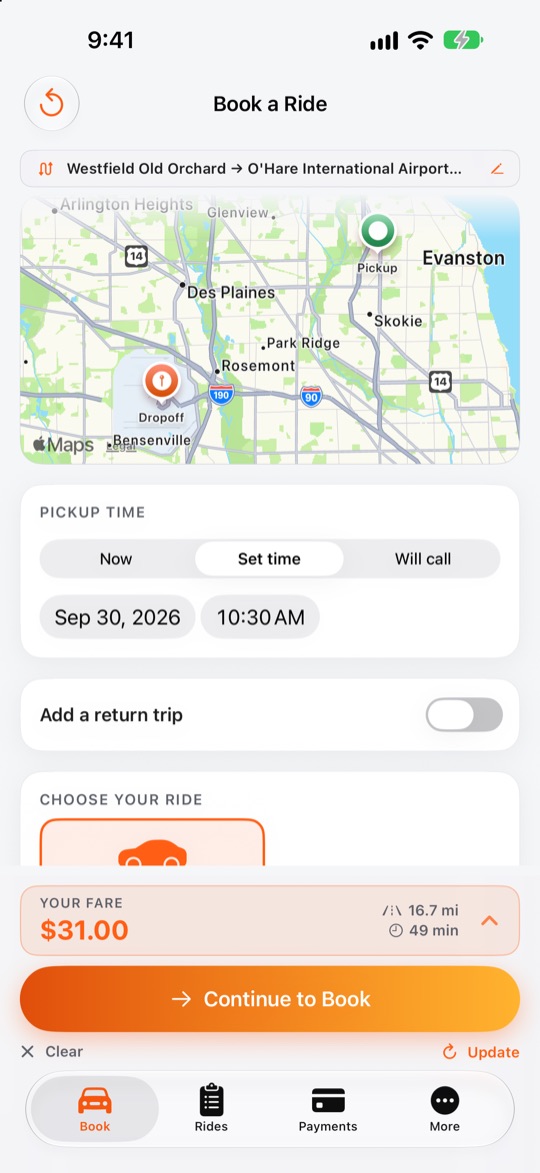
Flat-rate rides to and from O'Hare and Midway from Chicago's north, northwest and southwest suburbs. You can see your price, book, pay and follow your driver, all from your phone.
The Ride X Taxi app
Flat-rate rides to and from O'Hare and Midway from Chicago's north, northwest and southwest suburbs. You can see your price, book, pay and follow your driver, all from your phone.
How it works
You enter your pickup and the airport, or tap a saved place, then pick a time.
You'll see the full price before you book and can add a flight number, passengers and pickup notes for your driver.
You sign in with your mobile number and a texted code, pay by card, and get your confirmation right away.
You can follow your driver on the map and get an alert when they arrive, with nothing to pay in the taxi.
What you get
You'll see the full price to O'Hare or Midway up front, locked when you book, with no surge and no meter.
You can schedule ahead for an early flight, request a ride now, or book your ride home in the same booking.
You can follow your taxi on the map, see its estimated arrival, and get alerts when your driver is assigned, on the way and has arrived.
You can save home, work and the terminal you always fly from, then fill them in with one tap.
You can save a card for next time. Stripe handles payment, so your card number never reaches our servers.
You can see upcoming rides and ride history, rebook a past trip, cancel, or get a receipt by email or PDF.
App support
When you enter your mobile number, we text you a 6-digit code, so there's no password to remember. You can look up flat rates without signing in; you sign in when you book or open My Rides.
Check that your number is correct and that your phone can receive texts, then wait a minute and tap to send a new code. After a few tries the app pauses new codes for a short time to protect your account. If you still need help, call 708-725-1212.
In the app. You pay your flat rate by card when you book, and there is nothing to pay in the taxi. Your card details go straight to our payment processor, Stripe, and never reach our servers.
Open Rides and tap your active ride to see your driver on the map with an estimated arrival time. With notifications on, we tell you when a driver is assigned, on the way and arrived. On iPhone your ride status also shows on the Lock Screen.
Make sure notifications are allowed for Ride X Taxi in your phone's Settings, then check More > Notifications in the app, where you can choose which alerts you get. Alerts about a driver being assigned or on the way are sent close to your pickup time, not hours ahead.
Open Rides, tap the ride and choose Cancel. The app shows what you will get back before you confirm. Cancelling is free up to 1 hour before pickup; inside 1 hour, or if the driver can't find you, we refund your fare minus a $10 fee.
We text your receipt when you book. In the app, open any ride under Rides to email yourself a receipt or save a PDF.
You can install the latest version from the App Store or Google Play. We ask for an update only when an older version can no longer book correctly. You can always book on the website in the meantime.
In the app, go to More > Delete account. On the website, open My Rides and choose Delete my account. We remove your saved cards and places; we keep basic ride records we are required to keep.
You can call us at 708-725-1212. Tell us your phone model and what you were doing when it happened, and we'll sort it out.
Still need help? Call us at 708-725-1212. Please tell us your phone model and what you were doing when it happened.
Booking takes two minutes online. It's a flat rate with no surge. We assign your taxi before you travel and text updates on the day.